Reorder Your Speediance Workouts and See the Same Order on the Gym Monster
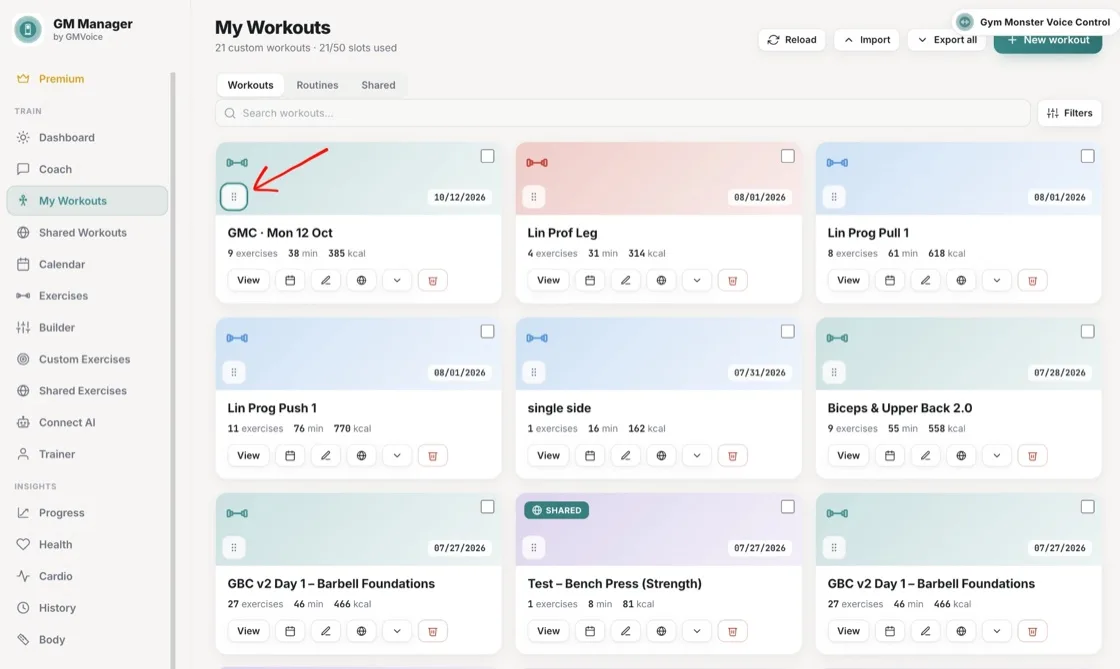
Drag your custom workouts into the order you like in My Workouts, and your Gym Monster shows them in the same order.
Favourites on top, less scrolling, more lifting
The order you set for your Speediance custom workouts is the order your Gym Monster shows. Put the workouts you use most at the top and spend less time scrolling.
How to reorder your Speediance workouts
- Open My Workouts in GM-Manager.com.
- Drag the handle on a workout card to the place you want it.
- Your Gym Monster shows your workouts in the same order.
Frequently asked questions
Does the order I set show on my Gym Monster?
Yes. Drag your custom workouts into the order you like in My Workouts, and your Gym Monster shows them in the same order.
Can my AI assistant reorder my workouts?
Yes. Ask your AI assistant to reorder your workouts.
What does the AI Coach do with the order?
The AI Coach puts the sessions it planned for today and the next few days at the top for you.
Try GM Manager
GM Manager is a web app for your Speediance Gym Monster: custom workouts, calendar, progress and more.