Speediance Exercise Notes: Show Your Own Notes on the Gym Monster Screen
Seat height, cable position, "keep your elbows in"... You can now write a private note on any exercise in GM-Manager.com, and it shows up on your Gym Monster screen.
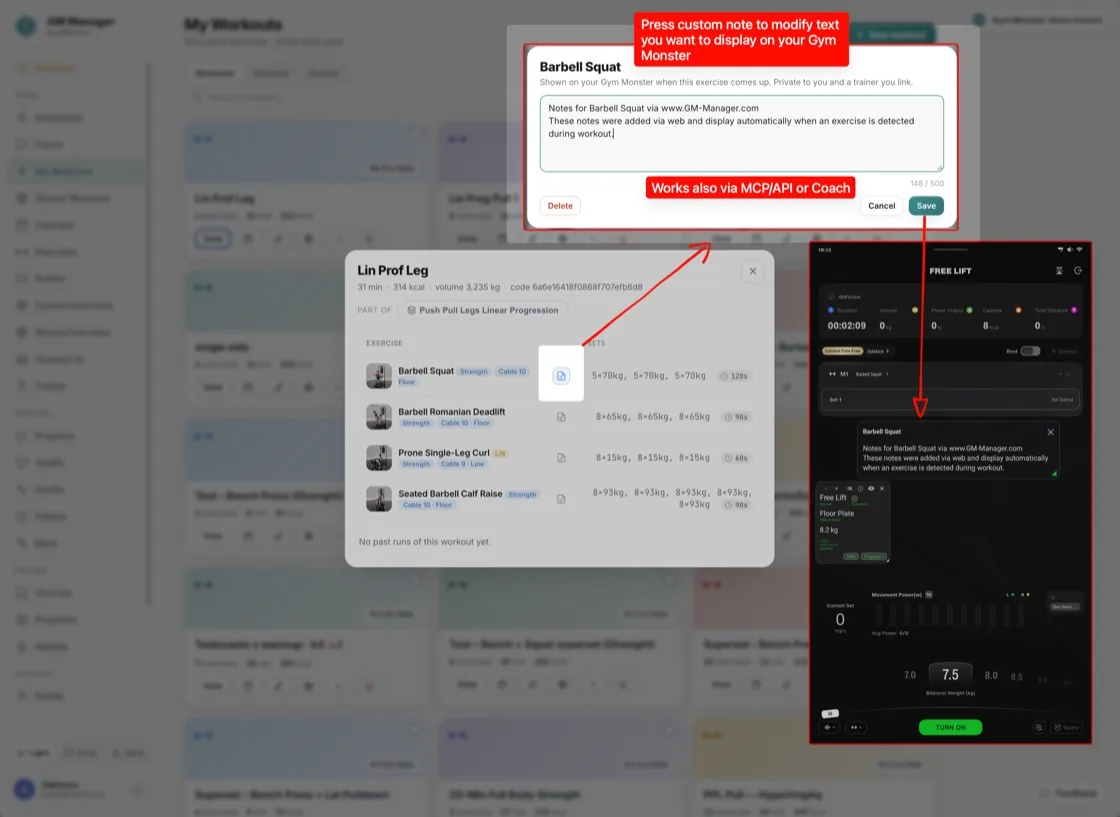
Your exercise notes, right on the Gym Monster
When that exercise comes up during your workout, the note appears on your Gym Monster screen automatically, so your brain can focus on lifting. You write the note on the web, in GM-Manager.com.
How to add an exercise note for your Speediance workout
- Open any workout in GM-Manager.com.
- Tap the note icon next to an exercise.
- Type your note.
- Save it.
That's it.
Who can see your notes
Your notes are private: only you see them, plus a trainer if you have linked one. A trainer can also write exercise notes for an athlete (see the Trainer plan).
Frequently asked questions
Are my Speediance exercise notes private?
Yes. Only you see your notes, plus a trainer if you have linked one.
Do the notes show on the Gym Monster screen?
Yes. When that exercise comes up during your workout, the note appears on your Gym Monster screen automatically.
How do I add a note to an exercise?
Open any workout in GM-Manager.com, tap the note icon next to an exercise, type your note and save it.
Can my AI assistant or the AI Coach use my notes?
Your AI assistant can read and write your notes, and the AI Coach can read them when it plans your sessions.
Try GM Manager
GM Manager is a web app for your Speediance Gym Monster: custom workouts, calendar, progress and more.